Amaron is one of India’s most trusted automotive and inverter battery brands, manufactured by Amara Raja Batteries Limited. Their batteries are widely used in cars, two-wheelers, inverters, and UPS systems — and each comes with a warranty ranging from 24 months to 60 months depending on the model. But warranty cards get misplaced, purchase receipts fade, and years pass without anyone checking whether coverage is still active. Checking your Amaron battery warranty online takes a few minutes and can save significant money during a replacement or service situation.
What You Need Before Checking
Two pieces of information are required for any online warranty verification:
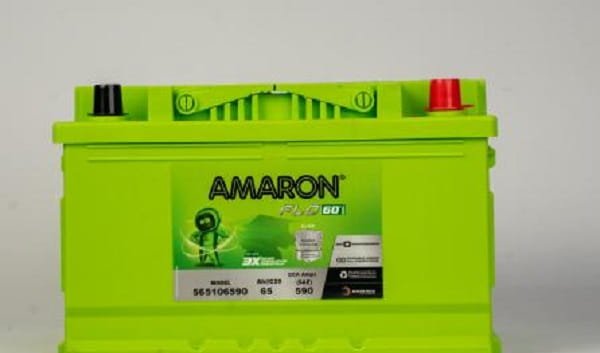
Battery Serial Number — This is the unique identifier printed directly on the battery body, typically on a sticker or label on the top or side of the battery. It’s an alphanumeric code specific to your unit. Locate it physically on the battery before beginning the online process.
Date of Purchase — The date the battery was sold, as recorded on your purchase invoice or warranty card. Even if you don’t have the card, the purchase date is needed for the warranty period calculation.
Having both ready before opening any website saves time and avoids incomplete form submissions.
Method 1: Amaron Official Website — Warranty Registration and Status Check
Visit www.amaron.com from any browser on your phone or computer. Navigate to the Warranty section — it appears in the top navigation menu or can be accessed via the footer of the site.
The warranty section has two key functions:
Warranty Registration — If you purchased a new Amaron battery and haven’t registered it yet, this is where you register it. Entering the serial number, purchase date, and your contact details activates the warranty record in Amaron’s system. Unregistered batteries can still be claimed under warranty, but registration provides a digital record that simplifies the process considerably.
Warranty Status Check — Enter your battery’s serial number in the provided field and submit the form. The portal returns your battery’s warranty status — showing the purchase date on record, the warranty period applicable to your model, and the expiry date. If the battery is within its warranty period, the remaining coverage duration is displayed.
If the serial number isn’t found in the database, it may indicate the battery was never registered or that the serial number was entered incorrectly. Double-check the number on the battery body carefully — zeros and the letter O are frequently confused, as are ones and lowercase Ls.
Method 2: Amaron Konnekt App
Amaron’s official mobile app — Amaron Konnekt — is available on both Google Play Store and Apple App Store and is the most feature-rich method for managing your battery warranty.
After downloading and installing the app:
Step 1: Open Amaron Konnekt and create an account or log in if you already have one.
Step 2: Navigate to Product Status or Warranty Registration from the app’s main menu.
Step 3: Enter your battery’s serial number. The app also supports scanning the vehicle number plate to auto-populate vehicle details for automotive batteries.
Step 4: The app displays your battery’s warranty status, remaining coverage period, nearest Amaron service centre (Pitstop), and service history if applicable.
The Konnekt app offers additional features worth noting — it includes a Battery Load Testing function that uses Bluetooth connectivity with a compatible tester device to check actual battery performance, a Fitment Chart that recommends the correct battery model for your specific vehicle, and a Network Locator to find the nearest Amaron dealer or service point. For regular Amaron users, it’s the most complete tool available.
Method 3: Dealer or Amaron Pitstop Verification
If online verification isn’t producing results — perhaps because the battery was purchased through an unregistered dealer or the serial number is damaged — visiting an authorised Amaron Pitstop or dealer directly is the most reliable fallback.
Carry the battery or the serial number along with any purchase documentation. Amaron service staff can access the warranty database directly and verify coverage status on their end. They can also register unregistered batteries from the dealer side if the purchase is recent enough.
Understanding Amaron’s Warranty Structure
Amaron batteries typically carry a total warranty period that combines two components: a free replacement period and a pro-rata period.
During the free replacement period — typically the first 12 to 24 months depending on the battery model — a defective battery is replaced at no cost if the fault is confirmed as a manufacturing defect.
During the pro-rata period that follows, a replacement is available at a discounted price proportional to the remaining warranty life. A battery still under pro-rata coverage is not replaced for free but is discounted based on how much warranty period remains.
The warranty card that came with the battery specifies the exact breakdown for your model. The standard warranty for Amaron car batteries is commonly 24 months with additional pro-rata coverage extending total protection to 48 or 60 months. Inverter batteries may have different terms.
The warranty does not cover damage from improper installation, overcharging, physical damage from accidents, or modifications by unauthorised technicians.
FAQs
Q: Where is the serial number on an Amaron battery?
A: It’s printed on a label or sticker on the top or side of the battery body. It’s an alphanumeric code unique to each unit — check carefully before entering it online.
Q: Do I need to register my Amaron battery to claim warranty?
A: Registration isn’t mandatory for warranty claims, but it creates a verifiable digital record. Unregistered batteries can still be claimed with original purchase invoice and warranty card.
Q: What is pro-rata warranty on Amaron batteries?
A: After the free replacement period ends, pro-rata coverage offers a replacement at a discounted price based on the remaining warranty period — the longer the remaining period, the greater the discount.
Q: My Amaron battery serial number isn’t found online. What should I do?
A: Verify the serial number carefully on the physical battery. If correct, visit an authorised Amaron Pitstop with the battery and purchase receipt — service staff can access the database directly.
Q: How long is the warranty on Amaron car batteries?
A: Standard Amaron car batteries come with a 24-month free replacement period, with total coverage including pro-rata extending up to 48 or 60 months depending on the specific model. Check the warranty card for your exact model’s terms.